Pages

Showing posts with label tech tip. Show all posts

Tuesday, March 29, 2016

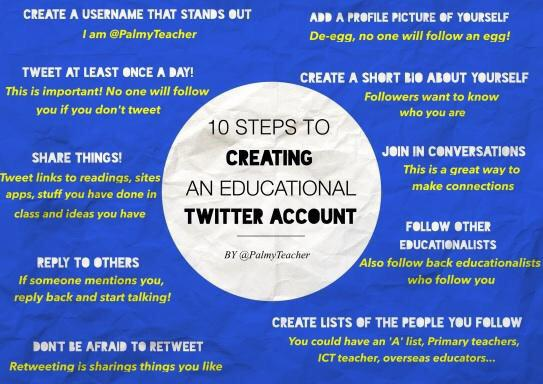
Now that you're on Twitter...


Who are you?

Twitter really only works if you have followers who are interested in what you have to say. Sure you can use Twitter to just receive information, read articles others send, or see pictures of other people's activities; but the real power is in having people follow you and connecting them to the things you find interesting. Once you start engaging with your followers, the magic of new ideas and learning start to flow!


A quick search through my Twitter followers reveals many of the people I follow have yet to add photos or bios to their Twitter pages. Initially, some users may be hesitant to share or identify themselves on social media. I understand where that fear can come from, but by catering to it, you limit yourself to a world of new ideas. In the social media landscape, people want to know who you are, what you are about, and what ideas you might share with them. A profile like this one gives me no information about who this person is or what they may have to contribute. 


Adding a photo or a basic bio gives your audience a chance to find out a little bit about who you are.  @Astro_Sandy uses a handle and has a picture that makes me think that she is an astronaut, however, I have to visit her Twitter feed before I can really know for sure. Col. Mike Fincke goes one step further by adding a basic bio that lets me know right away that he is, in fact, an astronaut. 


Leland Melvin, while having one of the most epic NASA profile photos ever, goes even one step further and adds a very detailed bio that lets his audience know who he is, what he is interested in, and I can see why I might want to follow him. Since I am interested in STEAM and I can see from his bio that he is too, I know he might share or tweet about information I will like. He's a great person for me to follow.

Since you've taken the time to create a Twitter account and added a few followers, make sure you also take the time to add a picture and descriptive bio to your profile. Check out this video for a guide on How to Upload a Twitter Profile Picture.


If you are just getting started with Twitter and are interested in connecting with other educators to enhance your own learning, check out this great tutorial: Beginner's Guide to Using Twitter for Professional Development.


As always, feel free to reach out to the Ed Tech Department for additional help or support!

Tuesday, March 15, 2016

Customizing your own blog with Blogger

​It's been awesome seeing so many FSUSD staff starting their own blogs! Several people have approached me, asking how they can customize their Blog template to reflect their school colors or change the layout to meet more of their needs.

Blogger makes this process pretty easy and gives the user lots of options for personalization. Follow these simple steps to access the Advanced Customization editor. For those who are looking for a video to follow, check out the one by The Blog Beautician posted at the end.

Go to your Blog Editor and select Template, then choose Customize.


You are now in the Template Designer. From here you can change anything in the design of your blog. To get to the spot to change your link colors, select Advanced.


Find and Select Links to bring up the options for changing your link colors. There should be a live preview of your blog below the template designer so you can see how the changes will look before you Apply the changes to your blog. Once you are satisfied with your changes, select the orange button and Apply to Blog. 

Blogger: For the Total Newbie by The Blog Beautician


Tuesday, March 1, 2016

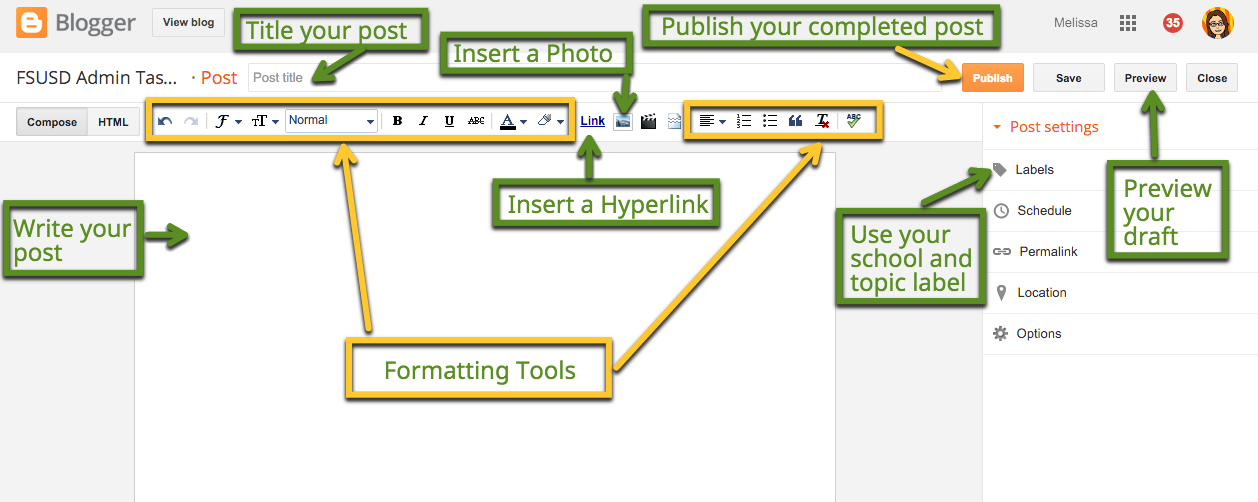
Anatomy of a New Post in Blogger

This is a little meta, however, for those of you who are new to Blogger, it may be helpful to be reminded of where different features can be found when creating a new post. 

Additionally, if you are creating several short posts to cover different topics, consider just writing one post and use Headings and Labels to let people know what info is contained in your post. 


Remember, if you need ANY assistance, you can reach out to me or your Ed Tech Specialist. We are happy to help!

Thursday, February 11, 2016

Getting Started with Blogger: Tutorial Videos

For those of you who are just getting started with Blogger, here are a few tutorial videos to help get you going with creating your posts. We will continue to review these topics during our Task Force Meetings. FSUSD administrators, remember you can always contact me or an Ed Tech Specialist to come walk you through the process.

Creating a New Post with Labels

This video goes through how to create a new post, give it a title and add labels. Remember adding labels helps to keep all your information accessible and lets readers of your blog quickly find posts relating to their interests.

Adding a Photo to your Blog Post

Photos help to keep your readers interested. Review this video to see how to a photo to your next blog post.

Creating a Hyperlink

A hyperlink helps keep information clear while letting your reader connect to other web pages for additional information WITHOUT having to post the entire URL.


Monday, August 4, 2014

Using a Link Shortener and QR Code Generator

This year many of you a embarking on a new journey to integrate technology into your classroom. Today's Tech Tip is designed to make sharing web addresses with others a little easier.

Web addresses, or URLs, are starting to get quite long. As the information available on the internet continues to expand, web addresses continue to get longer and longer. Normal this isn't a big deal if you are linking through from someplace else, but many of you will find yourself in a situation where you will want students to navigate to a specific web page, or the web link you plan to include in an email takes up 3 lines of text and disrupts the flow of your email, or maybe you are directing parents to a specific site in your class newsletter.  The reasons for needing to share a link are endless. Nothing is more frustrating than having to type in a long web address full of unfamiliar letter and number sequences. I can't tell you the number of times I have thought I typed in a URL correctly only to be one or two characters off. Here's where a link shortener can help! 

Friday, August 1, 2014

Creating a Google Community for Staff Collaboration

Creating and nourishing positive school communities is important. I am always looking for new ways to get people together and talking. Google+ Communities is one way to connect staff and offer a closed space for collaboration. In a closed community, posts are only shared with members of the community and can not be seen by non group members. 

Many of our principals have started blogs as a way to share information with staff. While a blog is a great way to send out information, it isn't always the best platform for collaboration. If your goal is to get everyone in your school contributing, sharing, and engaging with each other; check out the following steps for setting up your own Google+ Community! 

Creating Your Google+ Profile

One of my goals this year is to help people develop their Professional Learning Network (PLN). In order to develop a PLN and get connected, you have to begin by creating an online profile. Many educators are connected on Twitter, and we will get to that, but today we are going to start with Google+. If you already have a Google+ profile, please make sure you add a picture or graphic to help people find you. 

Google+ is a social network that comes free with any Google account. Because FSUSD is a Google Apps for Education (GAFE) district, everyone has access to a Google+ account. While access is granted for a Google+ account, users must activate their profile before they can begin using it to connect with others. This year we will be using the Communities within Google+ to create an online space to collaborate, discuss, and share resources. There are two different Communities set up to provide feedback and resources associated with the Units of instruction in both Math and ELA/ELD. You can find out more information about creating a Google+ Community in this blog post.

Let's get started with activating our Google+ profile.